ERP User Manual
Delivery List
The Delivery List page provides a comprehensive view of all delivery records linked to sales orders. It allows users to track, update, and manage the logistics of product deliveries (see Figure 6).
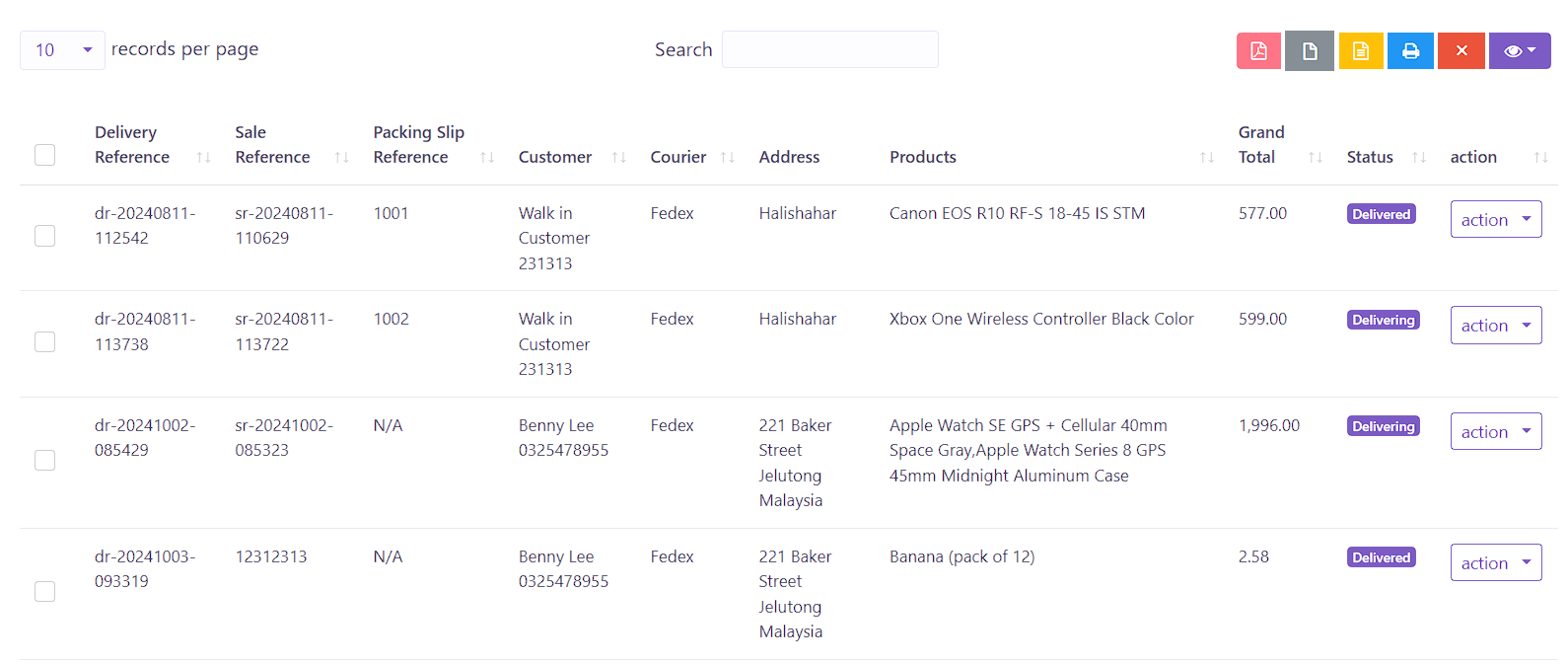 Figure 6: Delivery List Index Page
The delivery table includes the following columns:
- Delivery Reference – A unique reference code assigned to each delivery entry.
- Sale Reference – Indicates the sale record associated with the delivery.
- Packing Slip Reference – Reference number for the corresponding packing slip.
- Customer – Name of the customer receiving the delivery.
- Courier – The logistics provider or delivery person assigned.
- Address – The full delivery address for the shipment.
- Products – List of products included in the delivery.
- Grand Total – The total value of the delivery.
- Status – Current delivery status (e.g., Pending, Delivered, Cancelled).
- Action – Buttons for managing each record:
- Edit – Opens the delivery form to update details.
- Delete – Removes the delivery entry (if permitted).
This page helps ensure that every delivery is accurately tracked and provides a reliable audit trail for all shipping activities.